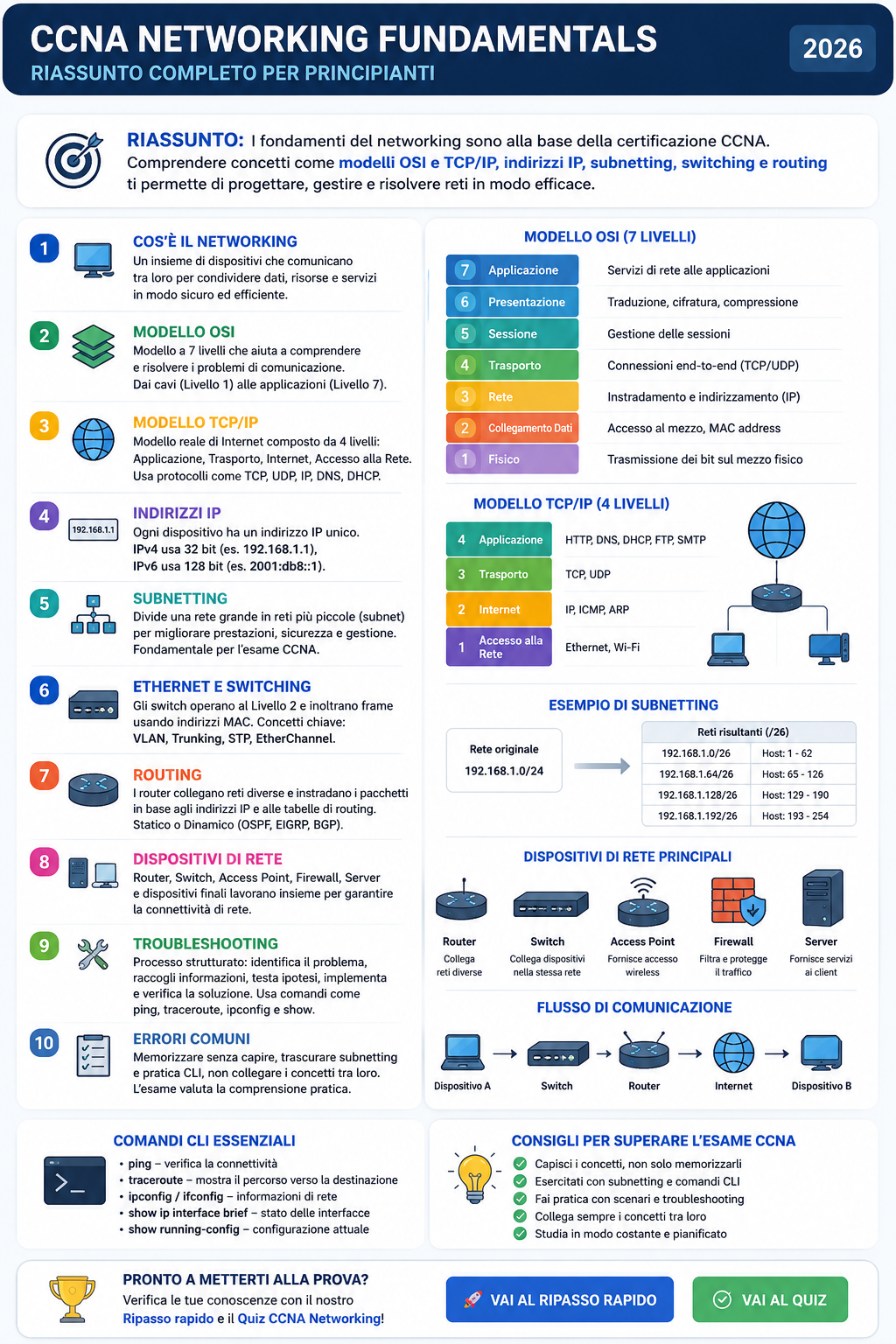
CCNA Networking Fundamentals Study Guide (2026) | OSI, TCP/IP, IP Addressing & Subnetting
Questa guida riassume i principali concetti di networking richiesti per il CCNA: OSI, TCP/IP, indirizzi IP, subnetting, switching, routing e troubleshooting.
CCNA Networking Fundamentals: Complete Study Guide for Beginners (2026)
What Is Computer Networking?
Computer networking is the foundation of modern IT. Every website, cloud application, email service, video call, and online transaction depends on networks working correctly.
A computer network is a collection of devices that communicate with each other to exchange data. These devices may include computers, servers, switches, routers, wireless access points, smartphones, printers, and cloud services.
The goal of networking is simple: allow devices to share information efficiently, securely, and reliably.
For anyone preparing for the Cisco CCNA certification, networking fundamentals represent the foundation upon which all advanced topics are built.
Understanding the OSI Model
One of the most important concepts in networking is the OSI model.
OSI stands for Open Systems Interconnection and divides network communication into seven layers:
- Physical Layer
- Data Link Layer
- Network Layer
- Transport Layer
- Session Layer
- Presentation Layer
- Application Layer
The OSI model helps network engineers understand where communication problems occur.
For example:
- A damaged cable is a Physical Layer issue.
- A MAC address problem is a Data Link issue.
- An IP routing problem is a Network Layer issue.
- A TCP connection failure is a Transport Layer issue.
Although real networks rarely follow the OSI model exactly, it remains one of the most important troubleshooting tools used by networking professionals.
TCP/IP: The Real-World Networking Model
While the OSI model is mainly educational, the TCP/IP model is the foundation of the modern Internet.
The TCP/IP model consists of four layers:
- Application
- Transport
- Internet
- Network Access
Protocols commonly used include:
- HTTP and HTTPS
- DNS
- DHCP
- TCP
- UDP
- IP
- ARP
Every device connected to the Internet relies on the TCP/IP model.
Understanding how data moves through these layers is essential for success on the CCNA exam.
IP Addressing Basics
Every device on a network requires an IP address.
An IP address uniquely identifies a device and allows communication between systems.
Example IPv4 address:
192.168.1.10
IPv4 addresses contain 32 bits and are typically written in dotted-decimal notation.
Because IPv4 addresses are limited, IPv6 was introduced.
Example IPv6 address:
2001:db8::1
CCNA candidates must understand:
- IPv4 addressing
- IPv6 addressing
- Public addresses
- Private addresses
- Default gateways
- Network masks
What Is Subnetting?
Subnetting is one of the most important CCNA topics.
Subnetting divides a larger network into smaller networks called subnets.
Benefits include:
- Better performance
- Improved security
- Easier management
- Reduced broadcast traffic
For example:
192.168.1.0/24
can be divided into smaller networks such as:
192.168.1.0/26192.168.1.64/26192.168.1.128/26192.168.1.192/26
Subnetting is frequently tested in CCNA exams and is considered a core networking skill.
Ethernet and Switching
Most local area networks use Ethernet technology.
Switches operate primarily at Layer 2 and forward frames using MAC addresses.
When a switch receives a frame, it:
- Learns the source MAC address.
- Updates its MAC address table.
- Forwards the frame to the correct destination port.
Switching significantly improves network efficiency compared to older hub-based networks.
Important CCNA switching concepts include:
- VLANs
- Trunking
- STP
- EtherChannel
- MAC address tables
Routing Fundamentals
Routers connect different networks together.
Unlike switches, routers make forwarding decisions based on IP addresses.
A router examines:
- Destination IP address
- Routing table
- Best available path
Routing can be:
Static Routing
Manually configured by administrators.
Dynamic Routing
Automatically learned using protocols such as:
- OSPF
- EIGRP
- BGP
CCNA places strong emphasis on OSPF because it is one of the most widely used enterprise routing protocols.
Common Network Devices
CCNA candidates should understand the purpose of key networking devices.
Router
Connects different networks.
Switch
Connects devices within the same network.
Wireless Access Point
Provides wireless connectivity.
Firewall
Filters and controls network traffic.
Server
Provides services to clients.
End Device
User devices such as laptops, phones, and desktops.
Basic Network Troubleshooting
Network engineers spend much of their time troubleshooting.
A structured troubleshooting approach includes:
- Identify the problem.
- Gather information.
- Establish a theory.
- Test the theory.
- Implement a solution.
- Verify functionality.
- Document findings.
Common troubleshooting tools include:
- ping
- traceroute
- ipconfig
- ifconfig
- show ip interface brief
- show running-config
These commands frequently appear in CCNA scenarios.
Common CCNA Networking Mistakes
Many candidates focus only on memorization.
Common mistakes include:
- Ignoring subnetting practice
- Memorizing without understanding
- Neglecting troubleshooting skills
- Avoiding command-line practice
- Studying topics separately without understanding how they interact
The CCNA exam evaluates practical understanding, not just theoretical knowledge.
Final Thoughts
Networking fundamentals are the backbone of the Cisco CCNA certification.
Master these concepts before moving on to Routing, Switching, Wireless, Security, and Automation.
Ready to test your knowledge?
👉 Take the CCNA Networking Quiz and identify your strengths and weaknesses before the real exam.
Discover your level
Take the free test and get your result by email.
Discover your level
Take the free test and get your result by email.
Ready to practice?
Jump into quizzes, train with realistic questions, and track your progress.